
ConvenientWorldMap3D1.2.7 - Google Play
You'll be able to see results in few seconds.
Publisher Description
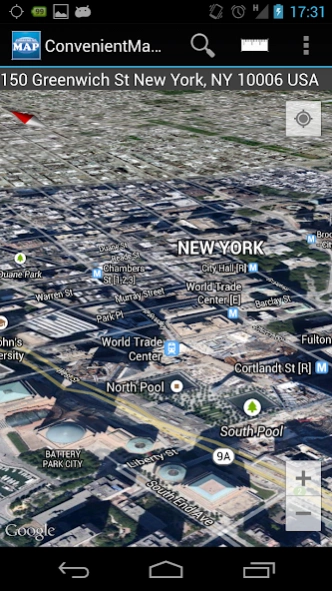


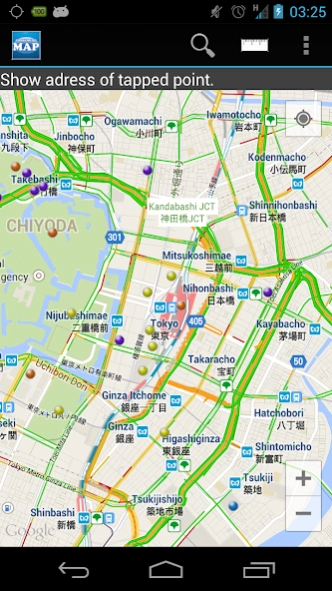
This is convenient map. It has several functions.
I created a 3D world map app a collection of useful features.
It has become a convenient map application that can be used not only travel, but also to everyday life and work.
[Gesture Control]
・2 fingers turns→turn a map(change direction)
・2 fingers slide→change camera position
[Feature List]
・Display your location
・Transfer to the location
・Transfer of the map, by address or keyword search
・Select from 4 Map types(Normal,Satellite,Terrain,Satellite(Hybrid))
・Show Traffic jam
・Spot display in Japan
・Registration of the pin(maximum 20)
・Adress display of tap point
・Display of Street View
・Distance measurement
Address, a keyword search, for example, if you search the "Roppongi", location of Roppongi, Minato-ku, Tokyo, Japan appears. Map can be displayed in the search by keyword and "Tokyo Sky Tree" and "Yokohama Chinatown".
In spot view of Japan, it is divided into 18 fields, "Shrine", "Temple", "Museum", "Art gallery", "castle", "historical site", "zoo" and "aquarium" etc. to display a mark to the map. You can also be displayed by selecting the only optional area.
The pin that can be a new registration, you will be able to describe the "title, time, and more" in the information of 1.
【OS version】
4.0 and over(under 4.0 may not works normally)
Enjoy it!
About ConvenientWorldMap3D
The company that develops ConvenientWorldMap3D is World Lab株式会社. The latest version released by its developer is 1.2.7.
To install ConvenientWorldMap3D on your Android device, just click the green Continue To App button above to start the installation process. The app is listed on our website since 2018-10-31 and was downloaded 0 times. We have already checked if the download link is safe, however for your own protection we recommend that you scan the downloaded app with your antivirus. Your antivirus may detect the ConvenientWorldMap3D as malware as malware if the download link to mapsecond.app is broken.
How to install ConvenientWorldMap3D on your Android device:
- Click on the Continue To App button on our website. This will redirect you to Google Play.
- Once the ConvenientWorldMap3D is shown in the Google Play listing of your Android device, you can start its download and installation. Tap on the Install button located below the search bar and to the right of the app icon.
- A pop-up window with the permissions required by ConvenientWorldMap3D will be shown. Click on Accept to continue the process.
- ConvenientWorldMap3D will be downloaded onto your device, displaying a progress. Once the download completes, the installation will start and you'll get a notification after the installation is finished.
Program Details
System requirements
Download information
Pricing
Version History
version 1.2.7
posted on 2018-10-31
v1.2.7
・update spot information
version 1.2.6
posted on 2017-11-11
v1.2.6
・update spot information
version 1.1.2
posted on 2014-11-11
v1.1.2,・cut down selectable spot fields,・reduce time for spot information reading
Disclaimer
Official Google Play Link
We do not host ConvenientWorldMap3D on our servers. We did not scan it for viruses, adware, spyware or other type of malware. This app is hosted by Google and passed their terms and conditions to be listed there. We recommend caution when installing it.
The Google Play link for ConvenientWorldMap3D is provided to you by apps112.com without any warranties, representations or guarantees of any kind, so access it at your own risk.
If you have questions regarding this particular app contact the publisher directly. For questions about the functionalities of apps112.com contact us.
